I’ve long be Linux curious, and my wish finally came true over the weekend when my son installed Fedora and GNOME on an old ThinkPad for me.
As I understand it, Fedora is the name of one of the Linux distributions, a.k.a. distro, and GNOME is the name of the desktop environment. The distro is the guts of the thing, and the desktop environment is how you interact with it.
I should add that this is GNOME 50, the most recent version. If you check the Wikipedia article, you’ll see that GNOME has gone through some major revisions over the years. (Oops, looks like GNOME 51 just came out.)
This one appeals to me because it reminds me of the Mac interface I’m used to, but doesn’t wind up being a clunky version of it. A three-finger swipe down brings up the equivalent of the dock, Spotlight and mission control, and a second three-finger swipe down brings up the equivalent of launchpad showing all the apps plus the desktops.
It was pleasantly surprised to find that it also looks pretty nice. I clearly had preconceived notions that were wrong.
The general feeling I get is one of wide open space. It’s your computer and you’re free to do whatever you please with it. This comes with that caveat that it can also be a little scary — you might be left with choice paralysis in some cases.
For example, I couldn’t figure out how to move a window without clicking down and holding on the track pad. I’m used to three-finger dragging with my Mac’s track pad, which I find both easy and elegant.
Turns out there are lots of way to move a window. You can even set things up to work with three-finger dragging if you’re willing to put in the time and effort. You can tweak Linux to your heart’s content. I know, though, that there are many people who are tweak-averse. They just want things to work.
Pre-installed apps, such as Firefox and Terminal, worked fine but I managed to hit a stumbling block with Maps. What can I say? I like maps, so I was drawn to it.
It looked pretty good, but I wanted it to find my location. Unfortunately, it kept putting me in a nearby town. There are technical reasons for this that may have something to do with where I live, and I might be able to fix it if I’m willing to do the work. The real answer, I learned, is that this app is seldom used because most people prefer the app on their phone.
So I was OK with moving on from that.
My next adventure was installing VSCodium. That went OK, but then I tried saving a file and was stymied by an error message. In the end, this was resolved by installing the “native” version as opposed to the Flatpak version. OK, now I know this is a thing.
I wanted to install the City Lights theme in VSCodium, but after way too much time going down rabbit holes in Terminal, I decided that the default theme is fine for now. I faced similar problems with City Lights for VSCodium on my Mac but was able to resolve them, so I might revisit this.
At this point, I had to ask myself whether these glitches were a typical experience on Linux or whether I was just having some bad luck. I will say that installing Filezilla and connecting to servers went without a hitch.
So what’s next? According to the GNOME subreddit, there are a bunch of new email apps out. Maybe I’ll try one of those. I’m kind of surprised there isn’t one pre-installed.
On that same subreddit, I saw an extension that changes the look of the icons. I checked out the instructions for installation — clone the repository and run the installer — and decided I’d had enough of Terminal for awhile. I might try again later.
Every once in awhile, I see a beautiful, minimalist blog with impeccable typography, like this one from Manuel Moreale, and think I should do something similar with Newsonaut.
But then I think Newsonaut is already minimalist. Take away the sun and stars and it’s especially minimalist. Try it for yourself with this button.
That will never work for me. If I’m going to turn my inner space into outer space, I need it to be in something that looks like outer space.
Like a lot of people, I’m bummed about Reddit cutting off RSS access. I have a few subreddits that I like to check on regularly in my feed reader, and their feeds will no longer exist after mid-November.
The good news is that Lemmy, the fediverse alternative to Reddit, has RSS feeds and likely always will. Lemmy usage has gone up substantially in recent years, so it’s not hard to find communities (their version of subreddits) with plenty of members and comments.
The bad news is that if you have a niche interest, there might not be an equivalent Lemmy community. Or if there is, it might not have much traction. Still, that could change if Lemmy’s growth continues.
In this example for the PC Gaming community, you would add “/feeds” after your Lemmy instance (mine is lemmy.ca), and tack “.xml” onto the end. Then copy and paste that into your feed reader.
https://lemmy.ca/c/pcgaming
https://lemmy.ca/feeds/c/pcgaming.xml
With my RSS app, Reeder, I just have to put in the name of a subreddit, and it does the rest. Not so for Lemmy. I have to put in the full URL.
I tried a bunch of communities using this method and they all worked with NetNewsWire on my Mac, with one heartbreaking exception — Star Trek. But there is a fix.
The Star Trek communities — there are a few of them — are on their own server at startrek.website. That means you need to use their instance instead of your own. So it comes out looking like this.
https://startrek.website/feeds/c/startrek.xml
There may be other communities like this, so it’s something to bear in mind.
Ideally, the makers of RSS apps would find a way of automating the process for us. I just might suggest that to some of them.
This is now officially the third highest yearly output for Newsonaut, having surpassed my 64 posts in 2014. The only years when I did better were 2012 with 135 and 2011 with 169.
Yes, this is my 66th post of 2026. There has been a resurgence lately in the indie web, and I’m happy to be a part of it.
I was a little bit sad, though, to read Bryce Wray’s last post. He basically doesn’t feel like he has anything left to say that would be of interest to readers.
It hits close to home because it appears he is only a few years older than me. I know the down sides of growing old. Health issues you never knew existed suddenly become part of your everyday life. It’s not as easy to summon the energy you once took for granted.
I can’t predict where I’ll be in a couple of years. I never would have predicted where I am now. But I’m pretty sure this blog will last for a few more years, and I’m optimistic that it will last many more years.
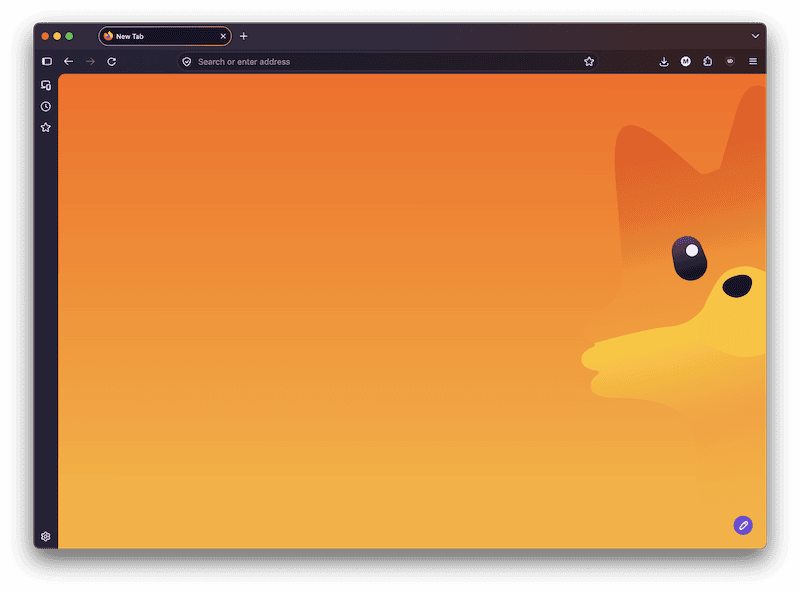
Firefox 157 has a slick new interface. And the internet is losing its shit.
The updated interface has been dismissed as “round” and already you can find instructions on how to roll back to the old look. And that’s a mild insult compared with “needless and ugly.”
Such drama!
At first the only difference I noticed was the tabs. They are more of a pill shape now and have an outline around them. The background has a subtle gradient that you can customize.
After clicking around a bit, I discovered that some of the menus have more-pronounced round corners. I was disappointed that the bookmark manager hadn’t been similarly updated. Oh, and the search box at the bottom has a pill shape similar to the tabs.
I’m no power user, so maybe there are other design changes that I missed. And honestly, if I hadn’t been told there were changes, I might not even have spotted them — at least not right away.
If you watch the accompanying video, it’s obvious that Firefox is reaching out to new users. A shiny new interface might seem useless to crusty old-timers, but marketing has shown time and again that many people respond to this. A thing can’t just be new, it has to look new.
It remains to be seen whether these efforts will do anything for the Firefox market share, but I’m glad to see them at least making an effort.
I’ve said in the past that I find posts written all in lower case to be hard to read, and I stand by that. I need a few capital letters here and there to get my bearings.
But that doesn’t mean I don’t have an appreciation for lower case. In fact I downright prefer it.
Capital letters have a boring lack of variety. They’re all the same height and they’re all kind of blocky. Sure they should be used, but sparingly.
Lower case letters have so much more diversity: half height (like a, c or e), three-quarters height (like t), or full height (with an ascender like b or d). Or a descender that takes them below the line: g, j, p, q, y.
There’s a reason you never see an entire sentence written in all caps. It’s even harder to read than all lower case. Radio announcers write their copy in all caps for this very reason. It forces them slow down and enunciate.
Let’s check out some particularly appealing lower case letters. If you’re not using serifs, you should switch so you can see how beautiful letters can be.
Two of my favourites are the ones with a tittle: i and j. You won’t find any capital letters with dots over them — at least not in English.
Another favourite is g: I love the loop on the bottom and the stem poking out the top.
And look at this a: See how nicely it curves on the top and leaves a bowl underneath — all in the space of half a capital.
Then there are the ligatures. Two f’s join as ff. An f and an i become fi. This is artistry you won’t see among the upper case.
The only real competitor among the capitals is Q with its swooping tail.
But what about headings? Write them like you would a sentence, but without a period at the end — no capitals unless necessary. And that includes what is known as title case.
With title case, pretty much every word is capitalized with the exception of some shorter words. The trouble with writing a heading as if it were a title is that real titles get lost in them. Suppose you want to put the title of book in your heading. If all the words are capitalized, it’s hard to know where the book title begins and ends.
A great use of lower case is Apple’s naming of some of its products with lower case letters at the beginning. For example, I’m writing this on an iMac, which runs on macOS. Do not be one of those pedants who insist on writing “MacOS.” I have no idea what they are trying to prove.
When the comics character Pogo said, “We have met the enemy and he is us,” he was referring to pollution. He might have said the same thing about the dreaded algorithm.
In a recent post at Skuthus, Skyler points out that the Bear Discover “trending list is full of naysayers, warnings, dire laments, and gripes.”
For those of taking us refuge in the indie web to get away from all that, Skyler’s conclusion hits hard.
“I just think the mudslinging should be minimized or the big guys will win, having proven that it's not them who are spreading the hate and negativity — it's US.”
The algorithm tries to feed us what we want. And if it’s feeding us negativity, we might want to reflect on that.
I looked at some trending posts on Bear Discover, and came up with positive alternatives. Would you have upvoted these, or would you have preferred the originals? I have to admit the negative versions do seem more compelling.
Original: F*ck Omarchy and right wing populism Alternative: Check out this awesome alternative to Omarchy
Original: For the last time I’m not downloading your stupid app Alternative: Use these browser extensions to avoid app requests from social media
Original: How to endure Instagram Alternative: How to enjoy Instagram
You’re driving along the information superhighway when suddenly you hear a siren, so you pull over. It’s the internet police.
The officer gets out and comes over to your window.
“What seems to be the problem, officer?”
“I had to pull you over because I noticed you used the word ‘lay’ incorrectly in one of your blog posts.
“You wrote that you were going to ‘lay low over the weekend’ when you should have written ‘lie low.’ Lay is a transitive verb, which means you’re doing something to something else. Examples would be ‘lay some bricks’ or ‘lay an egg.’ If you’re doing something on your own, you need an intransitive verb — in this case ‘lie.’ You can ‘lie on the couch,’ for example, or ‘lie low.’
“Every time I see someone write ‘lay’ when they mean ‘lie,’ I wonder what it is they are laying. So when you wrote ‘lay low,’ I had crazy thoughts about you laying some low bricks.
“When Bob Dylan sings, ‘Lay, lady, lay, lay across my big, brass bed,’ I ask myself what she could possibly be laying.
“It makes no sense.”
“Sorry, officer. It’s tricky trying to remember the difference between ‘lay’ and ‘lie,’ but I’ll try to do better in the future.”
“OK, I’ll let you off with a warning this time, but if it happens again you might get a ticket.”